DoDAO Robotics
Robotics teams need two things before training and testing: a clean simulation world for the robot, and the labeled synthetic data the vision and policy models will learn from. We build both for you.
Same robot motion, six randomized scenes — one short example of the synthetic data we generate for vision and policy training.
Simulation Setup
Robot, bench, parts, sensors and lighting modeled to match your real cell.
Synthetic Data
Labeled images, masks, depth, pose, sensor data and demonstrations.
What We Offer
Two services. One foundation.
Both services build on the same careful simulation of your cell. Engage us for one or both — most teams start with the simulation and add the data pipeline once the world is solid.
Simulation Setup
A clean simulation world for your robot.
When you start a robotics project, the first step is building a clean simulation world. We build that world for you so your team can focus on the parts that are unique to your product.
- Robot model with the correct joint chain, link frames and joint limits
- Workspace bench, table, floor, fixtures and safety enclosures
- Cameras, depth sensors and force/torque sensors placed to match the real cell
- Lighting and material settings tuned to the real conditions
- Physics, friction, mass and joint dynamics tuned for grasping and insertion
Built with
Gazebo Harmonic · Isaac Sim · Isaac Lab · URDF · USD · ROS 2
Synthetic Data
Labeled training data for your models.
Real-world data is slow and expensive to label. Synthetic data is rendered inside the simulator, where the system already knows the ground truth of every pose, every contact force and every pixel.
- Camera frames with bounding boxes and segmentation masks
- Depth at every pixel, plus pose and grasp labels
- Demonstration trajectories for behaviour cloning and diffusion policy
- Rare and edge cases generated on purpose
- Lidar, thermal, ultrasonic and force readings with realistic noise
Shipped in
LeRobot · Robomimic · RLDS · COCO JSON · HDF5 · MCAP rosbags · YOLO labels
How Our Engagements Work
From discovery call to handoff
Every engagement runs through the same five steps. The order is what keeps the timeline honest and the deliverables sharp.
- 01
Discovery Call
We talk through your robot, your usecase, and what you need shipped. We pick the right simulator (Gazebo or Isaac Sim) for the job.
- 02
Written Proposal
Within two business days you get a written proposal with scope, timeline and cost. No surprises later.
- 03
Simulation World
We build the robot, workspace, parts, sensors, lighting and physics so the scene matches your real cell.
- 04
Synthetic Data Pipeline
If your engagement includes data, we wire up the labeled-data pipeline next: detection, segmentation, depth, pose, demos and more.
- 05
Handoff
You get the project folder, the data, and a short doc that explains how to extend, retrain and ship to hardware.
Simulation Setup
When you start a robotics project, the first step is building a clean simulation world. We build that world for you so your team can focus on the parts that are unique to your product.
What We Build
Every simulation world has six pieces. We build all six for your specific usecase, then ship the project folder.
Robot Model
The robot with the correct joint chain, link frames, and joint limits. Loads cleanly in ROS 2 and MoveIt 2.
Workspace
The bench, table, floor, fixtures and safety enclosures around the cell. Matches the real dimensions you give.
Parts
The objects the robot picks, places or scans, at the right size, weight and material for realistic grips.
Sensors and Cameras
Cameras, depth sensors and force/torque sensors, placed where they sit on the real cell for in-sim testing.
Lighting and Materials
Light sources and surface materials matched to the real environment so vision models trained in sim work on camera.
Physics and Contacts
Friction, mass and joint dynamics tuned so grasping, insertion and stacking behave the same in sim as on hardware.
Why Start Here
Catch problems early
Spot reach, sensor or layout issues before any hardware is built.
Done in weeks
A working scene ready in weeks, not months.
Right tools picked for you
We pick Gazebo or Isaac Sim based on your robot.
Tools We Use
Gazebo
ROS 2 native. Free. Quick to iterate.

NVIDIA Isaac Sim
Realistic images. Built for AI training.

MuJoCo
Best contact and friction model.
Synthetic Data
Real-world data is slow and expensive to label. Synthetic data is rendered inside the simulator, where the system already knows the ground truth of every pose, every contact force, and every pixel.
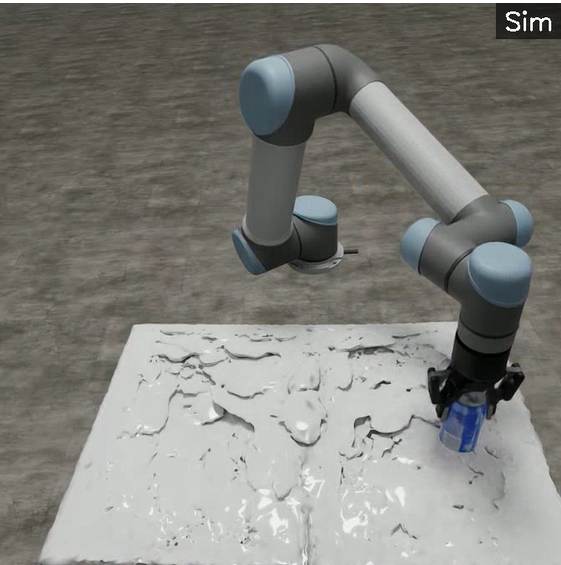
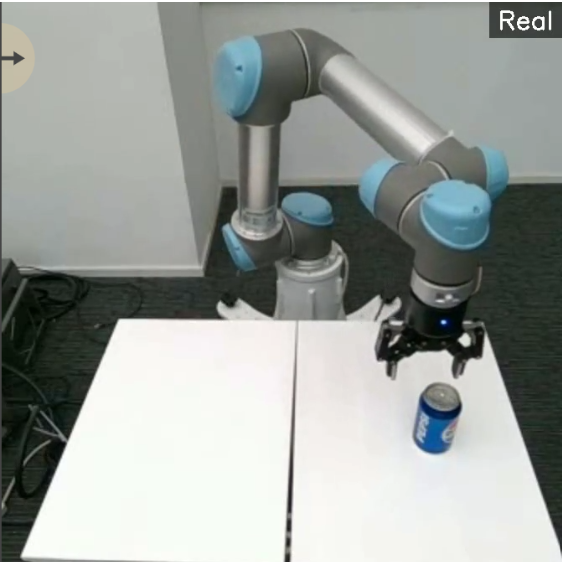
Same robot, same task — left side is the simulation we build, right side is the real cell. Policies trained on the left run on the right.
What We Produce
Detection images and masks
Camera frames with bounding boxes plus segmentation masks at every pixel. Ready to train YOLO or any model your team already runs.
Depth, pose and grasp labels
Depth at every pixel plus the position, orientation and grasp points of every object. The data picking and assembly models need.
Demonstration trajectories
Full observation and action logs of a teleoperated expert doing the task. The training set for behaviour cloning, diffusion policy and VLA models.
Rare and edge cases
Occlusions, damaged goods, glare, spills and people in the path. Generated on purpose so your model sees what real data rarely captures.
Non-camera sensors
Lidar point clouds, thermal frames, ultrasonic returns and force readings with realistic noise. For robots that rely on more than cameras.
OCR / barcode renders
Camera frames with generated text, codes and labels at random fonts, glare and angles. The training data OCR and barcode pipelines need.
How We Generate It
Shipped in your format
Let’s talk about your robot
Send us a short note about your robot and what you are trying to ship. We will get back to you with a written proposal that covers scope, timeline and cost. No long sales pitch, no commitment to keep talking.
Most teams hear back from us within two business days.